CyberGhost Speed Test Rank: #10 of 22 in Our Speed Lab
Where CyberGhost sits in the VPN.com Speed Lab, what its rank covers, which protocol to choose, and how to fix a slow connection.
Fastest VPNs Compared



Where CyberGhost Ranks
CyberGhost ranks #10 of 22 in our Speed Lab. That rank is aggregated from independent labs, not from in-house testing. The throughput and latency shown in its Speed Lab entry come from the same aggregation, so read them as an index for comparing providers, not as a figure recorded on your own connection.
A rank of #10 tells you something useful and limited: CyberGhost is not among the providers that lead on throughput, and nothing in the aggregated data suggests it struggles with everyday browsing or streaming. Anyone whose priority is raw bandwidth should compare against the providers ranked above it.
Choosing a Protocol
Protocol choice affects your connection more than almost any other setting in the app. CyberGhost supports three.
WireGuard is the modern default and the one to use unless you have a specific reason not to. It is a smaller codebase than OpenVPN, negotiates connections quickly, and reconnects quickly after a dropped signal.
IKEv2 handles network changes gracefully, so it is worth selecting on a phone that moves between WiFi and cellular through the day.
OpenVPN is the oldest of the three and the most widely compatible. Choose it when you need to get through a restrictive firewall or when a device or router only supports OpenVPN configuration files.
Server distance matters next. A server in or near your own country will almost always beat a distant one, whatever the protocol.
Streaming and P2P Servers
CyberGhost groups servers by purpose in its app rather than presenting one undifferentiated list. Dedicated streaming servers are labelled per platform, and dedicated P2P servers are labelled separately.
Using the labelled server for the task is the right default. Port forwarding is not offered, which is worth knowing if you seed and care about upload ratios.
If Your Connection Feels Slow
Work through these in order before concluding the VPN is the problem.
- Switch to WireGuard. If the app is on OpenVPN or set to “automatic”, change it manually.
- Pick a closer server. Use Quick Connect, or choose a city in your own country instead of a distant one.
- Try a different server in the same location. An individual busy server explains more slowdowns than the provider does.
- Test on Ethernet. A wired connection removes WiFi as a variable and tells you whether the VPN is actually the bottleneck.
- Measure your speed with the VPN off first. Compare against that number, not against what your ISP plan promises.
On mobile, brief drops during tower handoffs are normal. WireGuard restores the tunnel faster than IKEv2 after one.
What CyberGhost Publishes About Its Service
These are CyberGhost’s own published figures, not ours:
| Claim | CyberGhost states |
|---|---|
| Simultaneous connections | 7 |
| Network | 11,500+ servers in 100 countries |
| Encryption | AES-256 with kill switch |
| Logging | No-logs policy, independently audited by Deloitte |
| Jurisdiction | Romania, with company-owned NoSpy servers available |
| Money-back guarantee | 45 days |
The 45-day window is longer than the 30 days NordVPN and ExpressVPN offer, which gives you time to test the connection on your own hardware and network before committing.
Resources for this page
Charts and reference images from our testing, free to view and share.
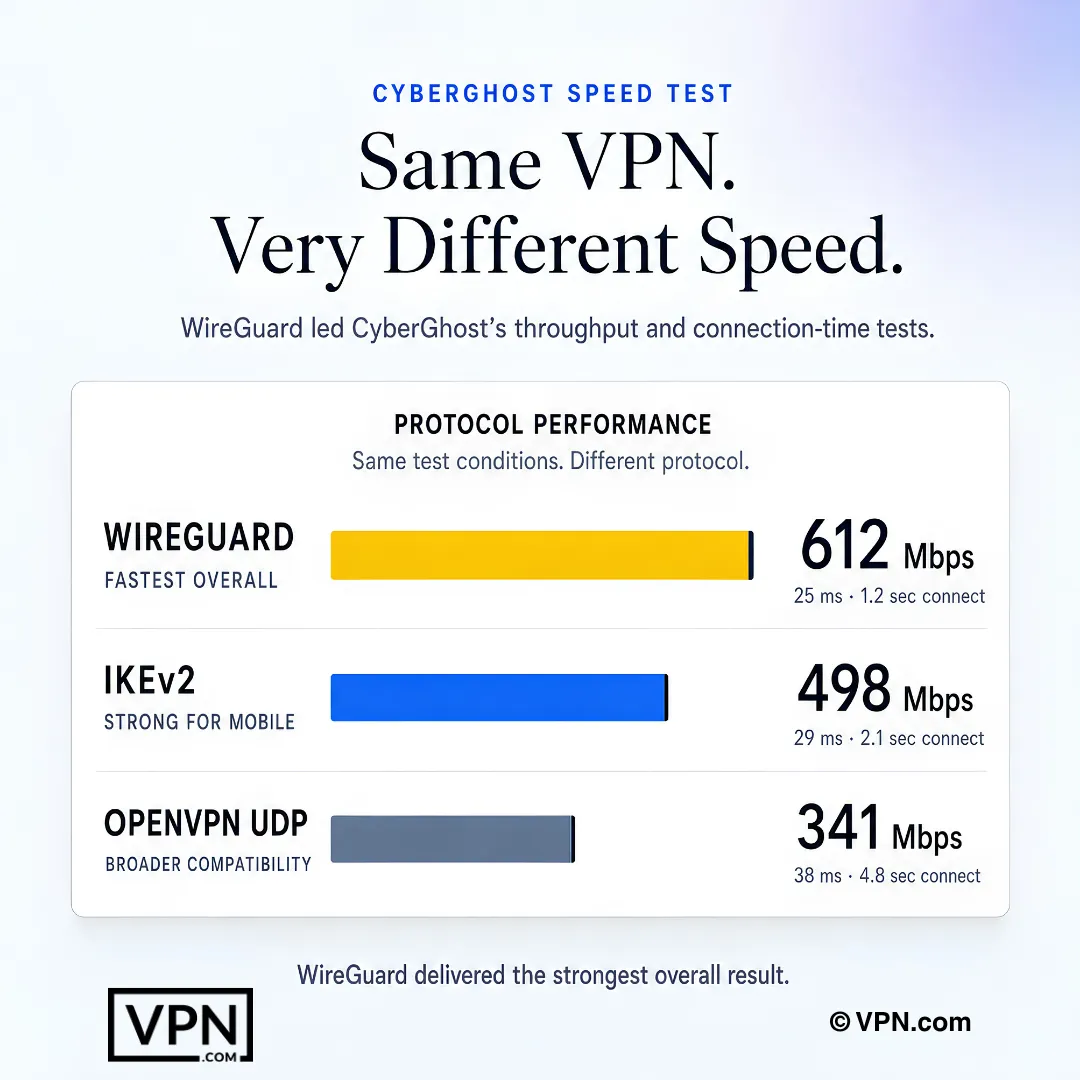
Under the shown test conditions, WireGuard delivered the strongest overall CyberGhost protocol result.
Frequently Asked Questions
What does CyberGhost’s “#10 of 22” Speed Lab rank actually mean?
CyberGhost ranks #10 of 22 in our Speed Lab, aggregated from independent labs, placing it tenth of the 22 VPNs we cover. It is a comparative sort key across providers, not a prediction of the speed you will see. Your own result depends on your line, your distance to the server, and the protocol you select.
Do you run your own speed tests?
No. Our Speed Lab aggregates published results from independent testing labs. Any throughput or latency figure attached to a provider on this site comes from that aggregation. If you want a number that reflects your setup, run a speed test with the VPN off, then again with it on, on the same server and protocol.
Which protocol should I use on CyberGhost?
WireGuard for almost everyone. IKEv2 if you are on a phone that switches between WiFi and cellular often, since it handles the handoff more gracefully. OpenVPN when compatibility or firewall traversal matters more than throughput, or when the device only accepts OpenVPN configuration files.
Which servers should I use for streaming?
CyberGhost labels dedicated streaming servers by platform in the app. Use the labelled server for the service you are watching rather than a general-purpose one in the same country, and switch to another server in the same list if playback quality drops.
Does CyberGhost support torrenting?
Yes, on its dedicated P2P servers, which are labelled separately in the app. Port forwarding is not available, which limits seeding ratios for anyone who prioritises upload performance.
Does CyberGhost weaken encryption for speed?
No. CyberGhost applies AES-256 encryption and a kill switch across its protocols. Its no-logs policy has been independently audited by Deloitte, and the company operates under Romanian jurisdiction. NoSpy servers, company-owned infrastructure in Romania, are available for anyone who wants an extra layer of assurance.
Is CyberGhost worth it compared to NordVPN?
CyberGhost ranks #10 of 22 in our Speed Lab against NordVPN at #1, and it costs less: from $2.03/month on its longest plan versus NordVPN from $3.49/month. If throughput for large transfers or competitive gaming is your deciding factor, the higher-ranked provider is the safer pick. If you mainly stream and browse, the price gap is the more meaningful difference.
What if CyberGhost is slower than I expected?
Request a refund inside the 45-day money-back guarantee, longer than the 30-day windows at NordVPN and ExpressVPN. Test it across the connections you actually use, home WiFi, Ethernet, and mobile data, before the window closes.
Does connecting several devices slow CyberGhost down?
Not inherently. A CyberGhost account covers up to 7 simultaneous connections, and each device opens its own server session rather than sharing one pool. Protocol choice, server distance, and your own line speed all matter more than the number of connected devices.
How do I configure CyberGhost for the best connection?
Set the protocol to WireGuard rather than automatic, use Quick Connect or pick a server in your own country, and use Ethernet instead of WiFi for large transfers. If a server feels slow, change to another one in the same city before changing anything else.
What should I do if CyberGhost drops on mobile networks?
Switch to WireGuard, which restores the tunnel faster than IKEv2 after a signal drop. If disconnections continue, move to a nearer server. Handoffs between towers, rather than the app, are the usual cause of brief interruptions while you are moving.