Our answer#1 of 3

NordVPN
Best for Streaming#1 of 22 in our Speed Lab · NordLynx on Android TV · router firmware for MAG boxes.
Get NordVPN30-day money-back guarantee
Decision guide · Updated September 2026
ISP throttling is a common cause of IPTV buffering. A VPN encrypts your stream so your ISP can't pick it out and slow it down.
NordVPN
Best for Streaming#1 of 22 in our Speed Lab · NordLynx on Android TV · router firmware for MAG boxes.
Get NordVPNThe ranking
Ordered by our overall score, aggregated from independent testing labs.


Picture this: Champions League final, injury time, and your stream freezes. Frustrating? Absolutely. Avoidable? Yes, with the right VPN.
A lot of IPTV buffering isn’t caused by your provider. Your ISP can detect streaming traffic and throttle it, even when your speed test looks fine. A 2022 study from Northeastern University and the University of Massachusetts[1] confirmed that major US ISPs throttle specific streaming protocols at rates that vary by time of day and content type. On top of that, streaming without protection exposes your IP address and viewing habits to anyone paying attention. The EFF’s surveillance self-defense guide[2] covers how ISPs collect and use traffic data.
A good VPN fixes both problems. But IPTV places unique demands that general streaming does not. Live channels rely on M3U playlists and EPG (Electronic Program Guide) data that refresh constantly. MAG devices and apps like IPTV Smarters or TiviMate need persistent, low-latency connections that tolerate zero packet loss. A VPN that works fine for Netflix can still choke on a live IPTV multicast stream.
For a broader look at VPNs across all streaming platforms, including Netflix, Hulu and live sports, see our complete guide to the best VPN for streaming.
The problems IPTV users face come down to four things:
A VPN encrypts your traffic so your ISP can’t identify or throttle it. It lets you connect through servers in other countries to access geo-restricted content. It hides your IP address from trackers and network monitors. For IPTV specifically, the encryption prevents your ISP from distinguishing live TV streams from any other HTTPS traffic.
Three providers cover what IPTV actually needs: a system-level app on TV boxes, router support for hardware that can’t run an app, and enough device slots for a whole house.
| VPN | Best For | Servers | Connections | Starting Price |
|---|---|---|---|---|
| NordVPN | Best overall for IPTV | 8,900+ / 129+ countries | 10 | ~$3.49/mo |
| ExpressVPN | Router firmware & MediaStreamer | 3,000+ / 105 countries | 8 | ~$3.26/mo |
| Surfshark | Android TV boxes & unlimited devices | 3,200+ / 100+ countries | Unlimited | ~$2.49/mo |
NordVPN ranks #1 of 22 in our Speed Lab, which aggregates published results from independent testing labs. For IPTV, the more useful part is coverage: it runs on the hardware IPTV actually lives on.
IPTV-specific strengths: NordLynx (WireGuard) is available on Android TV as well as desktop and mobile, and NordVPN publishes router firmware that covers MAG boxes and any IPTV receiver without a VPN app. IPTV Smarters Pro and GSE Smart IPTV need no in-app configuration, because the VPN operates at the system level. DNS leak protection matters here specifically: a leaked DNS request exposes the exact channel URL you requested to your ISP.
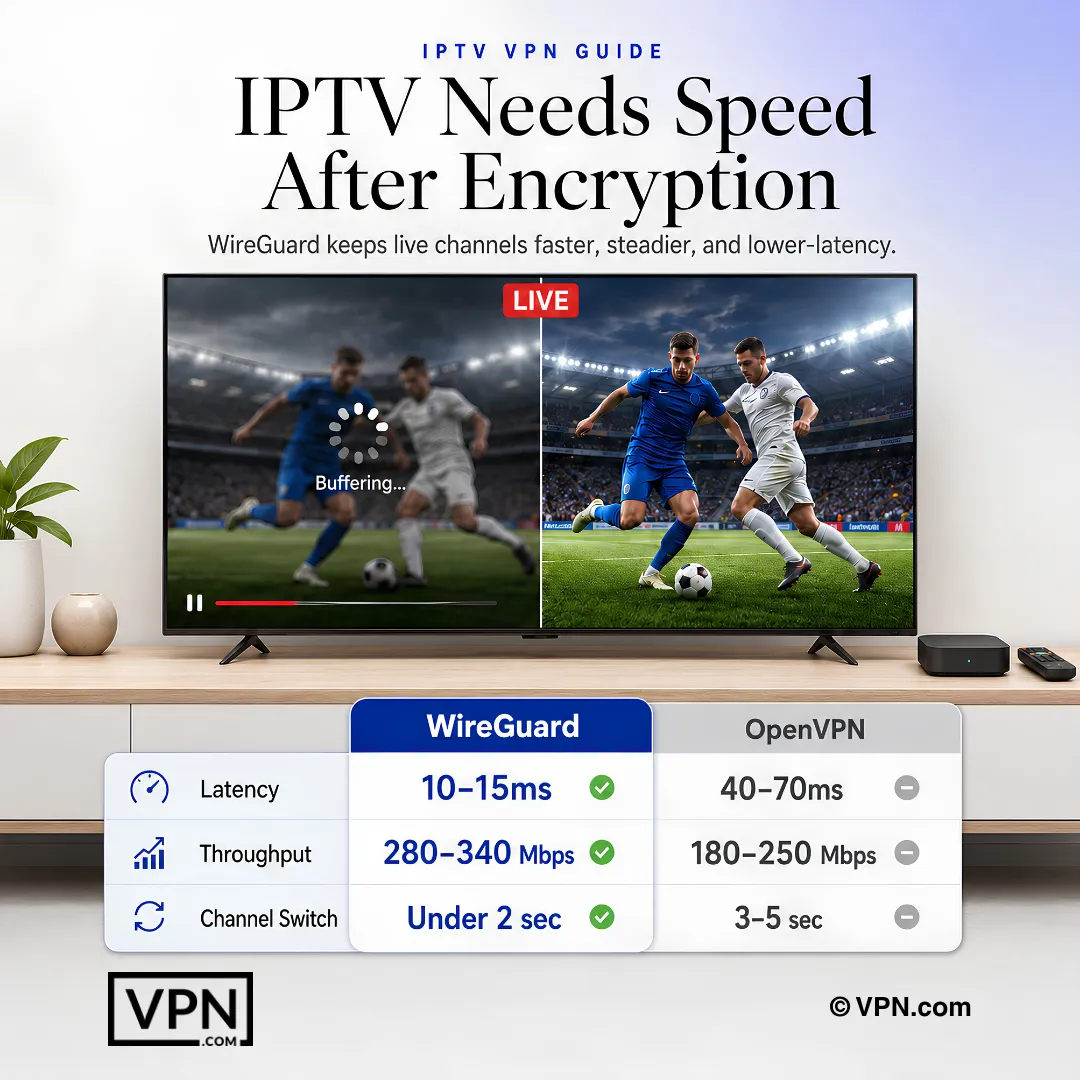
Protocol recommendation: Use NordLynx (WireGuard) for IPTV. OpenVPN adds handshake and processing overhead that tends to show up as delay when you switch channels on a live stream.
Device compatibility: Native apps exist for Android TV, Windows, Mac, iOS, and Linux. NordVPN also provides router firmware for Asus, Netgear, and TP-Link models, which covers MAG devices and any IPTV box that lacks native VPN support.
Limitations: The 10-device limit can be restrictive for households running IPTV on multiple TVs plus phones and laptops. Router-level installation counts as one device and covers everything on the network, which is the workaround.
ExpressVPN ranks #8 of 22 in our Speed Lab. Its case for IPTV is reach rather than rank: it is the easiest of the three to get onto hardware that cannot install a VPN app at all.
IPTV-specific strengths: ExpressVPN ships its own router firmware, so the whole network sits behind the tunnel without configuring each box. It also offers MediaStreamer, a DNS service that lets devices reach region-locked services without running VPN software. MediaStreamer does not encrypt traffic, so it addresses geo-restrictions but not ISP throttling.
Protocol recommendation: Lightway UDP is the default and the right choice for IPTV. Lightway TCP is the fallback for restrictive networks that interfere with UDP.
Device compatibility: ExpressVPN runs natively on Android TV, Fire TV, Windows, Mac, iOS, and Linux. The router app supports Asus, Linksys, and Netgear.
Limitations: Its best rate applies to a one-year term, where NordVPN and Surfshark discount two-year terms, so it renews sooner. It also allows fewer simultaneous connections than Surfshark.
Surfshark ranks #4 of 22 in our Speed Lab and stands out for households running IPTV on many devices at once. Unlimited simultaneous connections means every TV, tablet, phone, and set-top box connects without juggling device slots.
IPTV-specific strengths: There is no per-device cap, so a house with two Android TV boxes running TiviMate, a PC running IPTV Smarters, a tablet and a couple of phones never has to log one device out to connect another. WireGuard is available on every platform Surfshark supports.
Protocol recommendation: WireGuard is the clear choice for Surfshark IPTV use. IKEv2 is a reasonable fallback on mobile. Avoid OpenVPN for live IPTV, since it carries the most overhead of the three options.
Device compatibility: Native apps cover Android TV, Fire TV, Windows, Mac, iOS, and Linux. Surfshark supports router installation on Asus, DD-WRT, and Tomato firmware. For M3U-based IPTV services on older set-top boxes, router setup is the recommended path. IPTV Smarters Pro, TiviMate, and GSE Smart IPTV each run over a system-wide VPN connection without extra setup.
Limitations: Surfshark’s network is smaller than NordVPN’s (3,200+ servers versus 8,900+). If a location feels congested, switching to another server in the same country usually resolves it.
Protocol choice matters more for IPTV than for general browsing or file downloads. Live streams are latency-sensitive. A 50ms delay feels like nothing on a webpage but creates noticeable lag on live sports.
WireGuard is the better protocol for IPTV in almost every scenario. It uses a leaner codebase (roughly 4,000 lines versus OpenVPN’s 70,000+), which reduces processing overhead on low-power devices like set-top boxes and TV sticks. Less overhead means quicker handshakes, so channel switching feels closer to what you get with no VPN at all.
OpenVPN UDP still works for IPTV, but the heavier codebase costs more on the same low-power hardware. Expect slower channel switching and more sensitivity to a congested connection.
When to use OpenVPN: Some networks block WireGuard’s UDP traffic. Hotels, corporate networks, and certain ISPs may interfere with it. OpenVPN TCP on port 443 disguises VPN traffic as regular HTTPS, which works around most blocks. Accept the trade-off only when WireGuard won’t connect.
For technical details on how WireGuard achieves its performance advantage, the WireGuard protocol whitepaper[3] explains the cryptographic routing approach that reduces handshake overhead.
Setup varies significantly by device. Below are device-specific instructions that cover the most common IPTV hardware.
MAG boxes and many dedicated IPTV receivers cannot install VPN apps directly. Router-level setup pushes all network traffic through the VPN tunnel.
IPTV Smarters Pro requires no VPN-specific settings. The app reads your M3U playlist URL or Xtream Codes login and streams through whatever network connection your device uses. If your VPN is active at the device or router level, Smarters routes through it automatically. One thing to verify: if your IPTV provider whitelists specific IP addresses, you may need to update your allowed IP in the provider’s dashboard after connecting to the VPN.
IPTV without a VPN leaves your stream open to ISP throttling and your viewing habits visible to anyone on the path. The right VPN encrypts the stream, accesses region-locked channels, and works on the box you actually watch on.
NordVPN is the strongest overall choice: #1 of 22 in our Speed Lab, NordLynx on Android TV, and router firmware for MAG boxes. ExpressVPN is the answer when the hardware cannot run a VPN app at all. Surfshark suits multi-room households where the device count is the real constraint.
Install it once, pick the right server, select WireGuard, and get back to watching.
VPN.com does not encourage or condone using VPN services to violate the terms of service of any platform. Information on this page is provided for educational purposes. Users are responsible for complying with the policies of the services they use.
Charts and reference images from our testing, free to view and share.
A lot of IPTV buffering comes from ISP throttling, not your connection speed. A 2022 study by Northeastern University and UMass confirmed major US ISPs throttle specific streaming protocols at rates that vary by time of day. IPTV is especially vulnerable because M3U playlist streams create recognizable patterns that deep packet inspection flags easily. A VPN’s encryption stops your ISP from identifying and slowing that traffic.
Yes, a VPN routes your connection through a server in the region where a channel or sports package is licensed, so the geo-block system sees a local IP address instead of your real one. NordVPN, ExpressVPN, and Surfshark all support this for live channels, though blackout enforcement still varies by broadcaster. Unlicensed IPTV content carries separate legal risk that a VPN doesn’t remove.
WireGuard is the better choice for IPTV in nearly every case. Its codebase runs roughly 4,000 lines versus OpenVPN’s 70,000+, cutting processing overhead on low-power set-top boxes and TV sticks, which is what keeps channel switching quick. Reserve OpenVPN TCP for networks that actively block WireGuard’s UDP traffic, and accept the added overhead as a trade-off.
NordVPN ranks #1 of 22 in our Speed Lab, which aggregates results published by independent testing labs, and Surfshark ranks #4 of 22. Both support WireGuard on Android TV and at router level, which is the combination IPTV needs. Surfshark is the better fit for a household streaming on several devices at once, because it places no cap on simultaneous connections.
It depends on the provider. Surfshark allows unlimited simultaneous connections, the strongest fit for multi-room households running IPTV on several TVs, tablets, and set-top boxes at once. NordVPN caps accounts at 10 devices and ExpressVPN at 8. Installing the VPN at the router level counts as one device but covers every box connected to that network.
MAG boxes can’t install VPN apps directly, so route them through a VPN-capable router instead. Confirm your router supports client mode, options include Asus Merlin, Netgear Nighthawk, DD-WRT, or Tomato firmware, then upload the WireGuard config file NordVPN or Surfshark provides, or ExpressVPN’s OpenVPN config or dedicated router firmware. Connect the MAG box to that router once the VPN shows as connected.
Install the app for NordVPN, ExpressVPN, or Surfshark from the Google Play Store on the box, sign in, then switch the protocol to WireGuard, labeled NordLynx on NordVPN or Lightway on ExpressVPN, under the settings menu. Connect to a server, then open TiviMate, IPTV Smarters Pro, or GSE Smart IPTV with no in-app changes needed since the VPN operates at the system level.
Check whether your IPTV provider whitelists specific IP addresses, since apps like IPTV Smarters Pro simply route through whatever connection is active, and a new VPN IP can fall outside that allowlist. Update the allowed IP in your provider’s dashboard after connecting. If that isn’t the issue, confirm WireGuard, NordLynx, or Lightway is selected instead of OpenVPN, which adds noticeably more overhead.
Switch to a different server location within the same country rather than dropping the VPN entirely, since one flagged IP doesn’t affect the whole network. Try two or three locations before you assume the service blocks the provider outright.
Using a VPN for IPTV is legal in most countries since the VPN itself is just an encryption tool. What actually matters is the legality of the IPTV service you connect to. Licensed providers like YouTube TV and Sling carry no VPN-related risk, while unlicensed services streaming copyrighted content without authorization carry legal risk regardless of whether you use a VPN.
Yes. Without a VPN, IPTV traffic exposes channel-level viewing data because each M3U stream URL maps to a specific channel, letting your ISP see exactly what you’re watching. A VPN encrypts that traffic so your ISP and network monitors see only encrypted data heading to a VPN server, with no visibility into which channels or streams you’re accessing.
NordVPN’s cheapest plan runs from $3.49/month on its 2-year term, Surfshark undercuts that from $2.49/month, and ExpressVPN’s longest-term rate runs $3.26/month but its regular price runs higher once that promotional term ends. Most IPTV viewers are well served by NordVPN or Surfshark, with ExpressVPN reserved for setups that depend on its router firmware or MediaStreamer.
Yes. NordVPN, ExpressVPN, and Surfshark each back their plans with a 30-day money-back guarantee, while CyberGhost extends that to 45 days. Use the window to test your specific IPTV app, MAG box, or router configuration, since buffering or compatibility problems on unusual hardware are exactly the scenario these guarantees exist to cover.